GDD Version: 1.5
Date: March 21, 2025
Authors: ArtechFuz3D
Project: Lotería II - Artist Edition (Bingo-style multiplayer game with community-made art)
Deployment: Frontend on itch.io (https://loteria2artistedition.itch.io/loteriaII), Backend on Render (https://loteriaii-artist-edition-backend.onrender.com)
- Overview 1.1 Game Concept Lotería II - Artist Edition is a digital, multiplayer reimagination of Bingo with a creative twist, featuring community-designed icons. Players match host-called icons to their 4x4 boards, aiming to complete selected patterns (row, column, diagonal, full board, or combinations). The game uses a deck of 54 unique icons (currently mdi SVGs, to be replaced with community art), fostering a collaborative, artistic experience. Players mark matches with a red “X” (planned to evolve into virtual “beans”), and the first to complete a pattern declares “¡Lotería!” to win.
1.2 Genre Casual Multiplayer Real-Time Social Game Board Game Adaptation 1.3 Target Audience Casual gamers aged 10+. Fans of Bingo, Lotería, or pattern-matching games. Art enthusiasts drawn to community-driven visuals. 1.4 Platforms Web-based (itch.io frontend, Render backend). Compatible with modern browsers (Chrome, Firefox, Safari) on desktop and mobile. 2. Gameplay 2.1 Core Mechanics Host Setup: Host (Game Master) creates a room, selects winning patterns, and controls game flow (start, speed, pause, review) without participating as a player. Minimum 2 players (excluding host) required to start. Unique 6-character room code and shareable link (e.g., https://loteria2artistedition.itch.io/loteriaII#code=[CODE]) generated, stored server-side for auto-joining. Host can kick or ban players (partial socket implementation, UI pending). Player Setup: Players join via code or link, auto-joining if the link matches an active lobby. Each player selects a 4x4 board with 16 unique icons from a 54-icon pool; boards are randomized, marked unavailable once chosen. Gameplay: Host initiates icon calls at customizable speeds (1s, 3s, 5s, 10s, 30s, 5min planned). Players mark matching icons with a red “X” (toggleable); first to complete a pattern clicks “¡Lotería!” to win, verified server-side. Review: Host can pause and review called icons in a popup overlay with resume/close options. Game Over: On win or host disconnect, game pauses, displaying winner or end message. Host sees “Return to Lobby” and “Exit Game”; players see “Exit Game.” Restart requires all players to return to lobby and ready up again. 2.2 Game Flow Landing: Logo badge, “Play” button loads first menu. Semi-hidden global connected players div (visible here and first menu, hidden later). Menu First: Logo badge, name input (optional, auto-generates Player_[ID]), “Host Game” button, room code input, “Join Game” button. Global connected players div visible. Menu Second (Host Only): Logo badge, winning pattern selection (checkboxes: row, column, diagonal, full board, multiple/all), “Confirm” button. Lobby: Host Lobby: Logo badge, lobby code, shareable link, winning patterns, call speed dropdown, name input, connected players list (lobby-specific) with kick/ban UI (pending), “Toggle Ready,” “Start Game.” Player Lobby: Logo badge, name input, connected players list (lobby-specific), card selection (4x4 grids), “Toggle Ready.” All players must ready up to start. Playing: Host: Logo badge, lobby info (code, patterns, speed), current/next card display, buttons (pause, review, manual draw, “Return to Lobby,” “Exit Game”). Player: Logo badge, 4x4 board, last called icon, “¡Lotería!” button, “Exit Game.” End: Game pauses on win with confetti; host sees “Return to Lobby” and “Exit Game,” players see “Exit Game.” Room persists until all players disconnect. 2.3 Winning Conditions First player to cover one or more host-selected patterns wins by clicking “¡Lotería!”, validated server-side. 3. Features 3.1 Current Features (Implemented) Multiplayer: Real-time via Socket.IO, min. 2 players + host. Host Privileges: Pattern selection, call speed (1s, 3s, 5s, 10s, 30s), kick/ban sockets (no UI yet). Board: 4x4 grid, 16/54 unique icons (SVGs not visible, data present). Lobby: Split host/player views, lobby-specific player lists, card selection (clunky toggle mechanics). Gameplay: Toggleable “X” marking, “¡Lotería!” win check, confetti on win. Server Status: Green/yellow indicator with messages (fully functional). Visuals: New gradient (#97e0da via #eaccf8 to #937ef3), palette (#ffde9e, #6fe8f9, #f9a140, #fcffc8, #0f6480, #ffbfc3, #ffe466), dark blue (#0f6480) borders with clip-path. Fonts: Wendy One (primary), Oswald, Roboto (accents). Audio: Polytone effects (card clicks, wins, hovers, new icons, background music). Deployment: AstroJS frontend on itch.io, Node.js backend on Render, managed with PNPM. 3.2 Planned Features SVG Visibility: Fix icon display in card selection. Bean Marking: Replace red “X” with community-designed bean token. Kick/Ban UI: Add to host lobby and in-game connected players list. Super Casual Speed: Add 5-minute call interval. Victory Feedback: Enhance win visuals beyond confetti. Community Art: Replace mdi SVGs with 54 Lotería-inspired icons. 4. Technical Design 4.1 Architecture Frontend: AstroJS with PNPM, entrypoint index.astro (UI, Socket.IO client), components (Header.astro, Intro.astro). Backend: Node.js + Socket.IO on Render. Styling: Tailwind CSS with inline styles, global gradient (bg-gradient-to-t from-[#97e0da] via-[#eaccf8] to-[#937ef3]), clip-path borders (#0f6480). 4.2 Game State Lobby (Server): players: Map of { id, name, ready, isHost, card, originalCard }. lobbyUrls: Map of { code: shareUrl }. Playing (Server): calledIcons: Set of called icon indices (0-53). callSpeed: Integer (ms): 1000, 3000, 5000, 10000, 30000 (5min pending). Client: Mirrors server state: gameState (landing, menu1, menu2, lobby, playing), lobbyCode, isHost, players, etc. 4.3 Data Flow Updated for kick/ban sockets (pending UI), card selection tweaks, and lobby disposal (to confirm with code). 5. Art & UI 5.1 Visual Style Gradient background (#97e0da to #eaccf8 to #937ef3). Color palette: #ffde9e, #6fe8f9, #f9a140, #fcffc8, #0f6480, #ffbfc3, #ffe466. Dark blue (#0f6480) borders with clip-path across all screens. 5.2 UI Elements Landing: Logo badge, “Play” button, semi-hidden global players div, server status indicator. Menu First: Logo badge, name input, “Host Game,” room code input, “Join Game,” global players div. Menu Second: Logo badge, pattern checkboxes, “Confirm.” Host Lobby: Logo badge, lobby code, shareable link, patterns, call speed, name input, connected players list (right, with kick/ban UI pending), “Toggle Ready,” “Start Game.” Player Lobby: Logo badge, name input, connected players list (left), card selection (right), “Toggle Ready.” Host In-Game: Logo badge, info (left: code, patterns, speed), current/next card (right), buttons (below: pause, review, manual draw, “Return to Lobby,” “Exit Game”). Player In-Game: Logo badge, 4x4 board, last called icon, “¡Lotería!,” “Exit Game.” 5.3 Art Icons: 54 mdi SVGs (data present, not visible), to be replaced with community art. Bean Token: Red “X” placeholder, planned community-designed bean. 6. Audio Polytone effects (sawtooth clicks, square fanfare wins, triangle hovers, sine blips, bingo-themed music). Planned: Lotería-themed sounds (maracas, trumpets). 7. Development Plan 7.1 Current Status Fully functional multiplayer game with updated styling, split host/player lobbies, and in-game screens. Deployed and working with AstroJS, PNPM, Tailwind, and Socket.IO. 7.2 Next Steps Fix SVG visibility in card selection. Add kick/ban UI for host in lobby and in-game. Implement 5-minute call speed. Add “Return to Lobby” and “Exit Game” buttons for host in-game. Replace “Bingo” with “Lotería!” on buttons. Finalize styling (transparent backgrounds, blue borders, layout tweaks). 7.3 Deployment Frontend: itch.io (https://loteria2artistedition.itch.io/loteriaII), local (pnpm dev on http://localhost:4321). Backend: Render (https://loteriaii-artist-edition-backend.onrender.com), local (node server.js on http://localhost:3000). 8. Notes from Co-Creator (Grok, xAI) SVG Visibility: Data present but not rendering—priority fix. Kick/Ban: Sockets exist, UI needed in host lobby and in-game. Lobby Disposal: Code review needed to confirm proper cleanup (see below). Game End: Restart requires lobby return and ready-up—works as expected, needs host button validation. 9. Technical Notes SVG Issue: Inspect shows icons assigned but not visible—likely CSS or rendering bug. Game Wrapper: Confirm game-wrapper div should have transparent background and #0f6480 clip-path border. Lobby Disposal: Awaiting code to verify room cleanup on full disconnect. Specific Responses Lobby Disposal: I can’t confirm the code behavior without seeing it. Please share your backend (server.js) and relevant frontend logic (index.astro or Socket.IO handlers) to verify room disposal when all players disconnect. Game Wrapper: Yes, the game-wrapper div should likely have background: transparent and the #0f6480 clip-path border, matching other screens. Confirm this matches your intent once code is reviewed. SVG Visibility: The issue sounds like a styling or SVG import problem. Share the card rendering code, and I’ll pinpoint the fix.
GDD
Version: 1.4
Date: March 05, 2025
Authors: ArtechFuz3D, Grok (xAI)
Project: Lotería II - Artist Edition (Bingo-style multiplayer game with community-made art)
Deployment: Frontend on itch.io (https://loteria2artistedition.itch.io/loteriaII), Backend on Render (https://loteriaii-artist-edition-backend.onrender.com)
1. Overview
1.1 Game Concept
Lotería II - Artist Edition is a digital, multiplayer reimagination of Bingo, infused with a creative twist featuring community-designed icons. Players match icons called by a host to their 4x4 boards, aiming to complete host-selected patterns (row, column, diagonal, full board, or combinations). The game uses a deck of 54 unique icons (currently placeholder SVGs from game-icons, to be replaced with community art), fostering a collaborative, artistic experience. Players mark matches with a red “X” (planned to evolve into virtual “beans”), and the first to complete a pattern declares “¡Bingo!” to win.
1.2 Genre
- Casual Multiplayer
- Real-Time Social Game
- Board Game Adaptation
1.3 Target Audience
- Casual gamers aged 10+.
- Fans of Bingo, Lotería, or similar pattern-matching games.
- Art enthusiasts drawn to community-driven visuals.
1.4 Platforms
- Web-based (itch.io frontend, Render backend).
- Compatible with modern browsers (Chrome, Firefox, Safari) on desktop and mobile.
2. Gameplay
2.1 Core Mechanics
- Host Setup:
- Host selects one or more winning patterns (row, column, diagonal, full board) before starting.
- A unique 6-character room code and shareable link (e.g.,
https://loteria2artistedition.itch.io/loteriaII#code=[CODE]) are generated for invites, stored server-side for auto-joining.
- Player Setup:
- Players join via code or link, auto-joining if the link matches an active lobby; each receives a 4x4 board with 16 unique icons from a 54-icon pool.
- Boards are randomized, ensuring no duplicates among players.
- Gameplay:
- Host initiates icon calls at a customizable speed (1s, 3s, 5s, 10s, 30s).
- Players mark matching icons with a red “X” by clicking, with toggleable marking (on/off).
- The first player to complete a selected pattern clicks “¡Bingo!” to win, verified server-side.
- Review: Host can pause and review called icons in a popup overlay with resume/close options.
- Game Over: On win or host disconnect, the game pauses, displaying the winner or end message, with “Restart Game” (host-only) or “Exit to Menu” options.
- Server Status: Indicator (green for connected, yellow for no connection) displays real-time server messages (e.g., “Failed to connect”).
2.2 Game Flow
- Menu:
- Players enter an optional name and choose to create or join a game.
- Host creates a room, generating a code and shareable link stored server-side.
- Players join via code (manual entry) or link (auto-joins using server-stored URL).
- Connected players list updates in real-time.
- Lobby:
- Displays room code, shareable link (host-only), player list (names, ready status, host tag), and winning patterns.
- Players toggle “Ready”; host selects call speed and starts when all are ready.
- Playing:
- Host calls icons at the chosen interval; the last called icon is shown prominently.
- Players mark/unmark matches with “X”; host can pause and review called icons.
- Player declares “¡Bingo!” on pattern completion, triggering server verification.
- End:
- Winner announced (e.g., “[Name] won with: Row 1”); game pauses with confetti on win.
- Host sees “Restart Game” to reset boards and resume in the same lobby; all see “Exit to Menu.”
- Game ends if host disconnects, notifying players with “Host disconnected.”
2.3 Winning Conditions
- First player to cover one or more host-selected patterns (row, column, diagonal, full board, or combination) wins by clicking “¡Bingo!”, validated by the server.
3. Features
3.1 Current Features (Implemented)
- Multiplayer:
- Real-time room-based play via Socket.IO.
- Host and players connect using a 6-character room code or shareable link (e.g.,
https://loteria2artistedition.itch.io/loteriaII#code=ABC123). - Auto-joining via server-stored lobby URLs when using share links.
- Board:
- 4x4 grid with 16 random icons from a 54-icon pool (currently
game-icons:abstract-001to054SVGs). - Players toggle matches with a red “X”.
- 4x4 grid with 16 random icons from a 54-icon pool (currently
- Lobby:
- Players toggle “Ready” status; list shows names, readiness, and host tag.
- Names customizable or auto-generated (
Player_[ID]). - Host selects winning pattern(s) via checkboxes and call speed (1s, 3s, 5s, 10s, 30s) via dropdown.
- Shareable link auto-joins players to the lobby server-side.
- Real-time connected players list in menu.
- Gameplay:
- Host initiates icon calls at selected intervals; last called icon displayed with SVG.
- Players mark/unmark with “X”; win detection for chosen pattern(s).
- ”¡Bingo!” button triggers server-side win check with confetti on victory.
- Ends if all 54 icons are called without a winner.
- Review Mode:
- Host’s “Review Cards” button pauses the game and shows called icons in a popup overlay.
- ”Resume Game” restarts calling; “Close” hides the popup without resuming.
- Game Over:
- On win, game pauses; winner announced (e.g., “[Name] won with: Diagonal”).
- ”Restart Game” (host-only) resets boards and resumes play in the same lobby.
- ”Exit to Menu” returns players to the main menu, notifying the server.
- Host disconnect ends the game with a message (“Game ended: Host disconnected”).
- Server Status:
- Indicator in top-left corner: green (#00ff00) for connected, yellow (#F4A261) for no connection, with messages (e.g., “Connected to server”, “Failed to connect”).
- Visuals:
- Terracotta palette:
#E2725B(red-orange),#F4A261(warm orange),#FDF6E3(off-white),#8C552F(deep brown). - Graffiti-inspired UI with jagged clip-paths, textured backgrounds (
grunge-wall.png,DAwi.webp), and glowing shadows.
- Terracotta palette:
- Audio:
- Polytone sound effects: card clicks (sawtooth), wins (square fanfare), button hovers (triangle), new icons (sine blip), background music (bingo-themed melody).
- Deployment:
- Frontend: itch.io (
https://loteria2artistedition.itch.io/loteriaII), local (npm run devonhttp://localhost:4321). - Backend: Render (
https://loteriaii-artist-edition-backend.onrender.com), local (node server.jsonhttp://localhost:3000).
- Frontend: itch.io (
3.2 Planned Features
- Board Selection:
- Replace
game-iconsSVGs with 54 community-made Lotería-inspired icons (arty theme, e.g., paintbrush, sun, mask).
- Replace
- Bean Marking:
- Swap red “X” with a community-designed virtual bean token.
- Victory Feedback:
- Enhance win visuals (e.g., larger animation) beyond current confetti.
4. Technical Design
4.1 Architecture
- Frontend: Astro, deployed on itch.io as static HTML/CSS/JS.
index.astro: Single-page app handling UI and Socket.IO client logic (plain JS).intro.astro,content-section.astro: Components for landing and sections.- Built with
npm run buildtodist/folder, uploaded to itch.io.
- Backend: Node.js + Socket.IO, hosted on Render.
server.js: Manages game state, rooms, and real-time events.
- Communication: Socket.IO over WebSocket (fallback to polling).
- CORS:
http://localhost:4321(dev),https://loteria2artistedition.itch.io(prod).
- CORS:
4.2 Game State
- Lobby (Server):
players: Map of{ id, name, ready, isHost, card, originalCard }.lobbyUrls: Map of{ code: shareUrl }for auto-joining via share links.- Stored in
gamesMap, keyed by room code.
- Playing (Server):
calledIcons: Set of called icon indices (0-53).started: Boolean for game status.callInterval: Interval ID for icon calling.paused: Boolean for pause state (true on win or review).callSpeed: Integer (ms) for call interval (1000, 3000, 5000, 10000, 30000).pattern: Array of winning patterns (e.g.,["row", "diagonal"]).
- Client:
- Local variables mirror server state:
gameState(menu,lobby,playing),lobbyCode,isHost,players,card,calledCards,winner, etc.
- Local variables mirror server state:
4.3 Data Flow
- Connect: Client emits
'clientInfo'withsocketId; server matches tolobbyUrlsand emits'autoJoin'if found. - Create Game: Host emits
'createGame'with{ pattern, shareUrl }, server generates code, stores URL inlobbyUrls, returns'lobbyCreated'with fullshareUrl. - Join Game: Player emits
'joinGame', server adds to room, emits'joinedLobby'. - Set Name: Player emits
'setName', server updates, broadcasts'playerUpdate'and'connectedPlayersUpdate'. - Toggle Ready: Player emits
'ready', server toggles, broadcasts'playerUpdate'. - Start Game: Host emits
'startGame'with{ lobbyCode, callSpeed }, server generates cards, emits'init'and'gameStarted'. - Call Icon: Server emits
'newIcon'at intervals (pausable), ends with'allIconsCalled'if 54 icons are exhausted. - Mark Icon: Player emits
'markNumber'with{ lobbyCode, row, col, toggle }, server updates, emits'cardUpdate'. - Pause Game: Host emits
'pauseGame', server pauses interval. - Resume Game: Host emits
'resumeGame', server resumes interval. - Review Icons: Host emits
'reviewCards', server returns called icons to host. - Declare Win: Player emits
'callBingo', server verifies, pauses game, emits'gameOver'with{ winner, wins }. - Restart Game: Host emits
'restartGame', server resets state, emits'init'and'gameStarted'. - Leave Game: Player emits
'leaveGame', server updates players, deletes empty game and URL. - Disconnect: Server detects, ends game if host, updates players otherwise.
5. Art & UI
5.1 Visual Style
- Vibrant terracotta palette:
#E2725B(red-orange),#F4A261(warm orange),#FDF6E3(off-white),#8C552F(deep brown). - Graffiti-inspired with jagged clip-paths, textured backgrounds (
grunge-wall.png,DAwi.webp), and glowing shadows. - Background features a twinkling stars effect (
TwinklingStars.astro).
5.2 UI Elements
- Menu:
- Name input, “Create Game” button, “Join Game” input/button (manual code entry), connected players list.
- Lobby:
- Room code (displayed), shareable link (host-only, clickable), player list (name, ready status, host tag), pattern checkboxes, call speed dropdown (host-only), “Toggle Ready” button, “Start Game” (host-only).
- Playing:
- 4x4 clickable board (toggles “X”), last called icon (SVG + text placeholder), player list, “¡Bingo!” button, “Review Cards” (host-only), game-over buttons (“Restart Game” host-only, “Exit to Menu”).
- Review overlay: Called icons list (SVGs), “Close”, “Resume Game”.
- Server status indicator: Top-left, green/yellow circle with messages.
- Feedback: Errors in terracotta red (
#E2725B), winner in warm orange (#F4A261), confetti on win.
5.3 Art (Artist Edition)
- Icons: 54 unique SVGs (
game-iconsnow, planned for community Lotería-inspired art, e.g., paintbrush, sun, mask). - Bean Token: Red “X” placeholder, to be a community-designed bean.
- Credit: Planned in-game credit (e.g., “Artist Edition by [Community Names]”).
6. Audio
- Current:
- Polytone effects via Web Audio API: card clicks (sawtooth), wins (square fanfare), button hovers (triangle), new icons (sine blip), background music (bingo-themed melody).
- Planned:
- Enhance with Lotería-themed sounds (e.g., maraca rattles, festive trumpets).
7. Development Plan
7.1 Current Status
- Fully functional multiplayer game with Socket.IO.
- Features: Room codes/links with server-side auto-joining, pattern selection, ready toggles, unique boards, real-time play, toggleable marking, pause/review, win detection with confetti, restart/exit options, server status indicator, polytone audio, terracotta UI.
- Deployed: Backend on Render (
https://loteriaii-artist-edition-backend.onrender.com); Frontend on itch.io (https://loteria2artistedition.itch.io/loteriaII).
7.2 Next Steps
- Board Selection:
- Replace
game-iconsSVGs with 54 community Lotería-inspired icons (arty theme, e.g., paintbrush, sun, mask).
- Replace
- Bean Token:
- Swap red “X” with a community-designed virtual bean.
- Victory Feedback:
- Enhance win visuals (e.g., larger animation) beyond current confetti.
7.3 Deployment
- Frontend: itch.io (
https://loteria2artistedition.itch.io/loteriaII), local (npm run devonhttp://localhost:4321). - Backend: Render (
https://loteriaii-artist-edition-backend.onrender.com), local (node server.jsonhttp://localhost:3000). - Testing: Local and deployed testing complete; itch.io iframe fully functional.
8. Notes from Co-Creator (Grok, xAI)
- Pattern Choice: Host selects multiple patterns pre-game - implemented.
- Joining: Room code and link with server-side auto-joining - implemented, links auto-join via stored URLs.
- Board: 4x4 with 16/54 unique icons, no duplicates - implemented.
- Gameplay: Host calls at adjustable speeds; players mark with toggleable “X” - implemented with polytone audio.
- Review: Host pauses and reviews called icons - implemented with resume/close options.
- Win: “¡Bingo!” triggers win check; pauses with confetti, restart/exit options - implemented.
- Server Status: Green/yellow indicator with messages - implemented.
- UI: Terracotta palette with graffiti style - implemented.
9. Technical Notes
- Icon Deck: 54 icons (SVGs now, community art planned).
- Latency: Socket.IO ensures real-time updates; tested on Render and itch.io, performs well.
- Scalability: Render free tier suits small groups; scale if needed.
- Art Source: Community Lotería-inspired icons to replace
game-icons. - itch.io iframe: Server-side URL storage bypasses cross-origin hash access issues.
Deployment URLs
- Frontend:
https://loteria2artistedition.itch.io/loteriaII(live; local:http://localhost:4321) - Backend:
https://loteriaii-artist-edition-backend.onrender.com(live; local:http://localhost:3000)
GDD
Version: 1.2
Date: March 03, 2025
Authors: ArtechFuz3D, [Co-Creator Name]
Project: Multiplayer Lotería - Artist Edition (Bingo-style game with community-made art)
Deployment: Frontend on Netlify (https://loteria-2.netlify.app), Backend on Render (https://loteriaii-artist-edition-backend.onrender.com)
1. Overview
1.1 Game Concept
Multiplayer Lotería - Artist Edition is a digital reimagination of the traditional Mexican game Lotería, crafted as a Bingo-style multiplayer experience featuring community-created art. Players match called cards to their 4x4 boards, guided by a host who sets winning patterns and controls game pacing. The game uses a deck of 54 unique icons (currently placeholder SVGs from game-icons, to be replaced with community art), promoting a collaborative, artistic vibe. Players aim to complete a host-selected pattern (row, column, diagonal, full board, or combination) by marking matches with a red “X” (planned to become virtual “beans”), with the first to finish declaring “¡Lotería!” to win.
1.2 Genre
- Casual Multiplayer
- Real-Time Social Game
- Board Game Adaptation
1.3 Target Audience
- Casual gamers aged 10+.
- Fans of Lotería or Bingo-style games.
- Art enthusiasts drawn to community-driven visuals.
1.4 Platforms
- Web-based (Netlify frontend, Render backend).
- Compatible with modern browsers (Chrome, Firefox, Safari) on desktop and mobile.
2. Gameplay
2.1 Core Mechanics
- Host Setup:
- Host selects one or more winning patterns (row, column, diagonal, full board) before starting.
- A unique 6-character room code and shareable link are generated for player invites.
- Player Setup:
- Players join via code or link, receiving a 4x4 board with 16 unique icons from a 54-icon pool.
- Boards are randomized, ensuring no duplicates among players.
- Gameplay:
- Host initiates card calls at a customizable speed (1s, 3s, 5s, 10s, 30s).
- Players mark matching icons with a red “X” by clicking, with toggleable marking (on/off).
- The first player to complete a selected pattern clicks “¡Lotería!” to win.
- Review: Host can pause the game and review called cards in a popup overlay.
- Game Over: On win, the game pauses, displaying the winner and offering “Restart Game” (host-only) or “Exit” options.
2.2 Game Flow
- Menu:
- Players enter an optional name and choose to create or join a game.
- Host creates a room, generating a code and shareable link (e.g.,
/game?code=[CODE]). - Players join via code or link, with code prepopulated from URL parameters.
- Lobby:
- Displays room code, shareable link (host-only), player list, and winning patterns.
- Players toggle “Ready”; host selects call speed and starts when all are ready.
- Playing:
- Host calls cards at the chosen interval; the last called card is shown prominently.
- Players mark/unmark matches with “X”; host can pause and review called cards.
- Player declares “¡Lotería!” on pattern completion, verified server-side.
- End:
- Winner announced (e.g., “[Name] won with: Row 1”); game pauses.
- Host sees “Restart Game” to keep the lobby and reset, all see “Exit” to return to menu.
- Game ends if host disconnects, notifying players.
2.3 Winning Conditions
- First player to cover one or more host-selected patterns (row, column, diagonal, full board, or combination) wins by clicking “¡Lotería!”, validated by the server.
3. Features
3.1 Current Features (Implemented)
- Multiplayer:
- Real-time room-based play via Socket.IO.
- Host and players connect using a 6-character room code or shareable link (e.g.,
http://localhost:4321/game?code=ABC123locally).
- Board:
- 4x4 grid with 16 random icons from a 54-icon pool (currently
game-icons:abstract-001to054SVGs). - Players toggle matches with a red “X”.
- 4x4 grid with 16 random icons from a 54-icon pool (currently
- Lobby:
- Players toggle “Ready” status; list shows names, readiness, and host tag.
- Names customizable or auto-generated (
Player_[ID]). - Host selects winning pattern(s) and call speed (1s, 3s, 5s, 10s, 30s).
- Shareable link prepopulates code for joining.
- Gameplay:
- Host initiates card calls at selected intervals; last called icon displayed.
- Players mark/unmark with “X”; win detection for chosen pattern(s).
- ”¡Lotería!” button triggers server-side win check.
- Review Mode:
- Host’s “Review Cards” button pauses the game and shows called icons in a popup.
- ”Resume Game” restarts calling; “Close” hides the popup.
- Game Over:
- On win, game pauses; winner announced (e.g., “[Name] won with: Diagonal”).
- ”Restart Game” (host-only) resets boards and resumes play in the same lobby.
- ”Exit to Menu” returns players to the main menu, optionally notifying the server.
- Deployment:
- Frontend: Local (
http://localhost:4321/game), Netlify (https://loteria-2.netlify.app/game). - Backend: Local (
http://localhost:3000), Render (https://loteriaii-artist-edition-backend.onrender.com).
- Frontend: Local (
3.2 Planned Features (Co-Creator Notes - Updated)
- Board Selection:
- Replace
game-iconsSVGs with 54 community-made Lotería card images.
- Replace
- Bean Marking:
- Swap red “X” with a community-designed virtual bean token.
- Victory Feedback:
- Add visual (e.g., animation) and optional audio cues for “¡Lotería!” wins.
- Audio:
- Implement optional sound effects (card calls, win declaration).
4. Technical Design
4.1 Architecture
- Frontend: Astro, deployed on Netlify.
LoteriaGame.astro: Handles UI and Socket.IO client logic (plain JS, no JSX).game.astro: Entry point (/gameroute), wrapsLoteriaGame.astrowith decorative icons.
- Backend: Node.js + Socket.IO, hosted on Render.
server.js: Manages game state, rooms, and real-time events.
- Communication: Socket.IO over WebSocket (fallback to polling).
- CORS:
http://localhost:4321(dev),https://loteria-2.netlify.app(prod).
- CORS:
4.2 Game State
- Lobby (Server):
players: Map of{ id, name, ready, isHost, card, originalCard }.- Stored in
gamesMap, keyed by room code.
- Playing (Server):
calledIcons: Set of called icon indices.started: Boolean for game status.callInterval: Interval ID for card calling.paused: Boolean for pause state (true on win or review).callSpeed: Integer (ms) for call interval.pattern: Array of winning patterns.
- Client:
- Mirrors server state with local variables (e.g.,
gameState,winner,calledCards).
- Mirrors server state with local variables (e.g.,
4.3 Data Flow
- Create Game: Host emits
'createGame'with patterns, server generates code, returns'lobbyCreated'. - Join Game: Player emits
'joinGame', server adds to room, emits'joinedLobby'. - Set Name: Player emits
'setName', server updates, broadcasts'playerUpdate'. - Toggle Ready: Player emits
'ready', server toggles, broadcasts'playerUpdate'. - Start Game: Host emits
'startGame'with speed, server generates cards, emits'init'and'gameStarted'. - Call Card: Server emits
'newIcon'at intervals (pausable). - Mark Card: Player emits
'markNumber'with toggle, server updates, emits'cardUpdate'. - Pause Game: Host emits
'pauseGame', server pauses interval. - Resume Game: Host emits
'resumeGame', server resumes interval. - Review Cards: Host emits
'reviewCards', server returns called icons. - Declare Win: Player emits
'callLoteria', server verifies, pauses game, emits'gameOver'. - Restart Game: Host emits
'restartGame', server resets state, emits'init'and'gameStarted'. - Leave Game: Player emits
'leaveGame'(optional), server updates players, may delete empty game.
5. Art & UI
5.1 Visual Style
- Clean, centered layout with a modern, minimalist design.
- Uses
game-icons:abstract-XXXSVGs as placeholders; planned for community Lotería art.
5.2 UI Elements
- Menu:
- Name input, “Create Game” button, “Join Game” input/button (code prepopulates from URL).
- Lobby:
- Room code, shareable link (host-only), player list (name, ready status, host tag), pattern checkboxes, call speed dropdown (host-only), “Toggle Ready” button, “Start Game” (host-only).
- Playing:
- 4x4 clickable board (toggles “X”), last called icon, player list, “¡Lotería!” button, “Review Cards” (host-only), game-over buttons (“Restart Game” host-only, “Exit”).
- Review overlay: Called cards list, “Close”, “Resume Game”.
- Feedback: Errors in red (clear after 5s), winner in green (24px).
5.3 Art (Artist Edition)
- Lotería Cards: 54 unique SVGs (
game-iconsnow, community art planned). - Bean Token: Red “X” placeholder, to be a community-designed bean.
- Credit: Planned in-game credit (e.g., “Artist Edition by [Community Names]”).
6. Audio
- Current: None.
- Planned: Optional sound effects (card calls, win declaration).
7. Development Plan
7.1 Current Status
- Fully functional multiplayer game with Socket.IO.
- Features: Room codes/links, pattern selection, ready toggles, unique boards, real-time play, toggleable marking, pause/review, win detection, restart/exit options.
- Deployed: Backend on Render (
https://loteriaii-artist-edition-backend.onrender.com); Frontend local testing complete, Netlify pending.
7.2 Next Steps
- Board Selection:
- Replace
game-iconsSVGs with 54 community Lotería images.
- Replace
- Bean Token:
- Swap red “X” with a community bean image.
- Victory Feedback:
- Add visual/audio win cues.
- Audio:
- Implement sound effects for calls and wins.
- Deployment:
- Deploy frontend to Netlify (
https://loteria-2.netlify.app/game).
- Deploy frontend to Netlify (
7.3 Deployment
- Frontend: Netlify (
loteria-2repo), local (pnpm devonhttp://localhost:4321). - Backend: Render (
loteriaii-backendrepo), live (https://loteriaii-artist-edition-backend.onrender.com), local (pnpm serveronhttp://localhost:3000). - Testing: Local complete; Netlify deployment pending.
8. Notes from Co-Creator (Updated)
- Pattern Choice: Host selects multiple patterns pre-game - implemented (row, column, diagonal, full).
- Joining: Room code and link with URL prepopulation - implemented.
- Board: 4x4 with 16/54 unique icons, no duplicates - implemented.
- Gameplay: Host calls at adjustable speeds (1s, 3s, 5s, 10s, 30s); players mark with toggleable “X” - implemented.
- Review: Host pauses and reviews called cards - implemented.
- Win: “¡Lotería!” triggers win check; pauses with restart/exit options - implemented.
9. Technical Notes
- Lotería Deck: 54 icons (SVGs now, community art planned).
- Latency: Socket.IO ensures real-time updates; tested locally, deployed performance pending.
- Scalability: Render free tier suits small groups; scale if needed.
- Art Source: Community Lotería images to replace
game-icons.
Deployment URLs
- Frontend:
https://loteria-2.netlify.app/game(pending; local:http://localhost:4321/game) - Backend:
https://loteriaii-artist-edition-backend.onrender.com(live; local:http://localhost:3000)
—
GDD
Version: 1.1
Date: March 01, 2025
Authors: ArtechFuz3D, [Co-Creator Name]
Project: Multiplayer Lotería - Artist Edition (Bingo-style game with community-made art)
Deployment: Frontend on Netlify (https://loteria-2.netlify.app), Backend on Render (https://loteriaii-artist-edition-backend.onrender.com)
GDD
1. Overview
1.1 Game Concept
Multiplayer Lotería - Artist Edition is a digital adaptation of the traditional Mexican game Lotería, reimagined as a Bingo-like experience with community-crafted art. Players match called cards to their boards, guided by a host who selects winning patterns and controls the game flow. The game leverages a unique deck of 54 community-made Lotería card images (currently using emojis as placeholders), fostering a vibrant, player-driven aesthetic. The goal is to cover a host-chosen pattern (row, column, diagonal, or full board) with a red “X” marker (to be replaced with virtual “beans”), with the first player to do so declaring “¡Lotería!” to win.
1.2 Genre
- Casual Multiplayer
- Real-Time Social Game
- Board Game Adaptation
1.3 Target Audience
- Casual gamers aged 10+.
- Fans of Lotería or Bingo-style games.
- Art enthusiasts appreciating community contributions.
1.4 Platforms
- Web-based (Netlify frontend, Render backend).
- Accessible via modern browsers (Chrome, Firefox, Safari) on desktop and mobile.
2. Gameplay
2.1 Core Mechanics
- Host Setup:
- Host selects a winning pattern (row, column, diagonal, full board, or combination) before starting.
- A unique room code and shareable link are generated for player invites.
- Player Setup:
- Players join via code or link, receiving a 4x4 board with 16 unique icons from a 54-icon pool (currently emojis).
- No two boards are identical.
- Gameplay:
- Host calls cards randomly at a customizable speed (3s, 5s, 10s).
- Players mark matches with a red “X” by clicking, with the ability to toggle marks on/off.
- First player to complete the chosen pattern clicks “¡Lotería!” to win.
- Review: Host can review called cards and pause the game for verification.
2.2 Game Flow
- Menu:
- Players enter a name (optional) and choose to create or join a game.
- Host generates a room with a code and shareable link.
- Players join via code/link, prepopulating the code if using the link.
- Lobby:
- Players see the room code, player list, and toggle “Ready.”
- Host selects pattern(s) and call speed, starting when all are ready.
- Playing:
- Host calls cards at chosen intervals; last called card is displayed.
- Players mark/unmark matches with “X”.
- Host can pause the game and review called cards in a popup.
- Player declares “¡Lotería!” upon pattern completion.
- End:
- Winner announced; game ends (or ends if host disconnects).
2.3 Winning Conditions
- First player to cover the host-selected pattern(s) (row, column, diagonal, full board, or combo) wins by clicking “¡Lotería!“.
3. Features
3.1 Current Features (Implemented)
- Multiplayer:
- Real-time room-based play via Socket.IO.
- Host and players join via room code or shareable link (
http://localhost:4321/game?code=[CODE]locally).
- Board:
- 4x4 grid with 16 random icons (emojis currently) from a 54-icon pool.
- Players mark matches with a red “X” (toggleable on/off).
- Lobby:
- Players toggle ready (including host).
- Custom or auto-generated names (
Player_[ID]) displayed and updated in real-time. - Host selects winning pattern(s) (row, column, diagonal, full board, or combo).
- Shareable link prepopulates room code for joining.
- Gameplay:
- Host starts; cards called at customizable intervals (3s, 5s, 10s).
- Players click to mark/unmark matches with “X”.
- Last called card displayed prominently.
- Win detection for selected pattern(s).
- ”¡Lotería!” button for win declaration.
- Review Mode:
- Host “Review Cards” button pauses the game and shows called cards in a popup.
- Optional “Resume Game” button to restart calling.
- Deployment:
- Frontend: Local testing (
http://localhost:4321/game), planned for Netlify (https://loteria-2.netlify.app/game). - Backend: Render (
https://loteriaii-artist-edition-backend.onrender.com), local testing (http://localhost:3000).
- Frontend: Local testing (
3.2 Planned Features (Co-Creator Notes - Updated)
- Board Selection:
- Replace emojis with 54 community-made Lotería card images; ensure unique 4x4 boards.
- Bean Marking:
- Replace red “X” with a community-designed bean token image.
- Victory Feedback:
- Enhance “¡Lotería!” win announcement with visual/optional audio cues.
- Audio:
- Add optional sound effects (card call, win declaration).
4. Technical Design
4.1 Architecture
- Frontend: Astro + React, static files on Netlify.
LoteriaGame.jsx: UI and Socket.IO client logic.index.astro: Entry point (/gameroute).
- Backend: Node.js + Socket.IO, Web Service on Render.
server.js: Manages game state, rooms, real-time communication.
- Communication: Socket.IO via WebSocket, proxied by Netlify (planned): _redirects in frontend/public: /socket.io/* https://loteriaii-artist-edition-backend.onrender.com/socket.io/:splat 200
4.2 Game State
- Lobby:
players: Map of{ id, name, ready, isHost, card, originalCard }.- Stored in
gamesMap on server, keyed by room code. - Playing:
calledIcons: Set of called card icons.started: Boolean for game status.callInterval: Interval ID for card calling.paused: Boolean for pause state.
4.3 Data Flow
- Create Game: Host emits
'createGame'with pattern, server generates code, returns'lobbyCreated'. - Join Game: Player emits
'joinGame', server adds to room, emits'joinedLobby'. - Set Name: Player emits
'setName', server updates, broadcasts'playerUpdate'. - Toggle Ready: Player emits
'ready', server toggles, broadcasts'playerUpdate'. - Start Game: Host emits
'startGame'with call speed, server generates cards, emits'init'and'gameStarted'. - Call Card: Server emits
'newIcon'every interval (pausable). - Mark Card: Player emits
'markNumber'with toggle (mark/unmark), server updates, emits'cardUpdate'. - Pause Game: Host emits
'pauseGame', server pauses interval. - Resume Game: Host emits
'resumeGame', server resumes interval. - Review Cards: Host emits
'reviewCards', server returns called icons. - Declare Win: Player emits
'callLoteria', server checks win, emits'gameOver'.
5. Art & UI
5.1 Visual Style
- Minimalist, centered layout with a modern aesthetic.
- Currently using emojis; to be replaced with community-made Lotería card images.
5.2 UI Elements
- Menu:
- Name input, “Create Game” button, “Join Game” input/button (prepopulates code from URL).
- Lobby:
- Room code, shareable link, player list (name, ready status, host tag), pattern selection, call speed dropdown (host-only), “Toggle Ready” button, “Start Game” (host-only).
- Playing:
- 4x4 board with clickable cells (toggle “X”), last called card display, player list, “¡Lotería!” button, “Review Cards” button (host-only, pauses game).
- Feedback: Error messages (red, auto-clear after 5s), winner announcement (green).
5.3 Art (Artist Edition)
- Lotería Cards: 54 unique images sourced from community artists (e.g., El Gallo, La Luna) - currently placeholders (emojis).
- Bean Token: Planned community-designed bean graphic (currently red “X”).
- Credit: Art to be credited to community contributors in-game (e.g., “Artist Edition by [Community Names]”).
6. Audio
- Current: None.
- Planned: Optional sound effects (card call, win declaration).
7. Development Plan
7.1 Current Status
- Fully functional multiplayer with Socket.IO.
- Deployed: Local testing complete; Render backend live (
https://loteriaii-artist-edition-backend.onrender.com); Netlify frontend pending deployment. - Features: Room codes/links, pattern selection, ready toggles, random boards, real-time play, toggleable marking, pause/review mode, win detection.
7.2 Next Steps
- Board Selection:
- Replace emojis with 54 community-made Lotería card images; ensure unique 4x4 boards.
- Bean Token:
- Replace red “X” with a bean image from community art.
- Victory Feedback:
- Enhance win announcement with visual/optional audio cues.
- Audio:
- Implement optional sound effects for card calls and wins.
- Deployment:
- Finalize Netlify frontend deployment (
https://loteria-2.netlify.app/game).
7.3 Deployment
- Frontend: Netlify (
loteria-2repo), local testing (npm run devonhttp://localhost:4321). - Backend: Render (
loteriaii-backendrepo), live athttps://loteriaii-artist-edition-backend.onrender.com, local testing (npm startonhttp://localhost:3000). - Testing: Local complete; Deployed testing pending Netlify setup.
8. Notes from Co-Creator (Updated)
- Pattern Choice: Host selects pattern(s) pre-game - implemented with row, column, diagonal, full board, and combos.
- Joining: Room code and shareable link for invites - implemented with URL prepopulation.
- Board: 4x4 with 16/54 unique icons (emojis now, Lotería cards planned) - implemented, no duplicates.
- Gameplay: Host calls cards at adjustable speed (3s, 5s, 10s); players see current card, mark with toggleable “X” - implemented.
- Review: Host reviews called cards in-game with pause functionality - implemented.
- Win: Player clicks “¡Lotería!” for pattern completion - implemented.
9. Technical Notes
- Lotería Deck: 54 icons currently as emojis; planned for community art with ≥10 unique board options confirmed.
- Latency: Socket.IO ensures fast updates; tested locally, pending deployed performance check.
- Scalability: Render free tier sufficient for small groups; scale up for larger lobbies if needed.
- Art Source: Community-made Lotería images (Artist Edition) to replace emojis.
Deployment URLs
- Frontend:
https://loteria-2.netlify.app/game(pending deployment; local:http://localhost:4321/game) - Backend:
https://loteriaii-artist-edition-backend.onrender.com(live; local:http://localhost:3000)
BACKEND
-
Create account
-
Create a new Master project
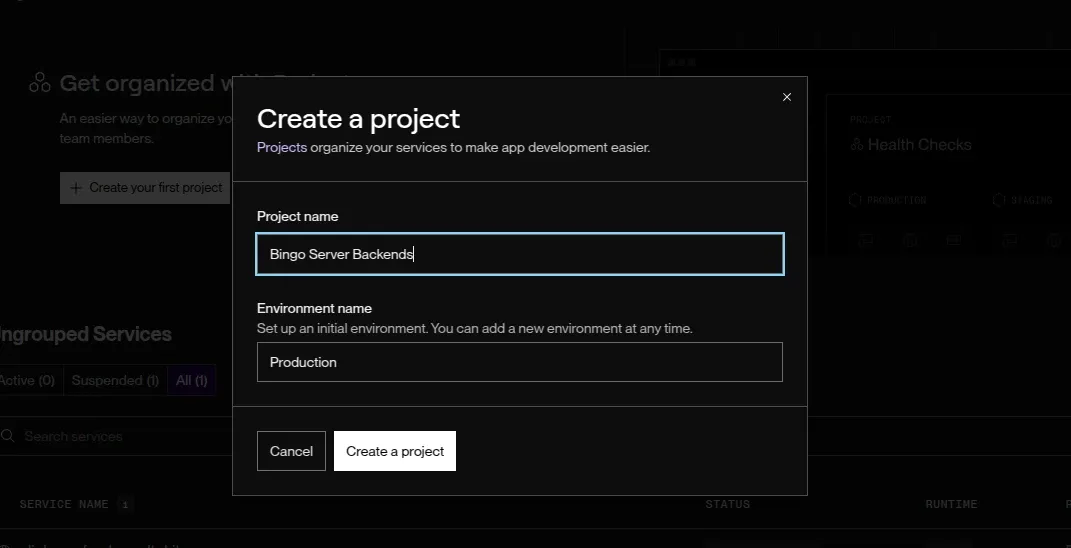
-
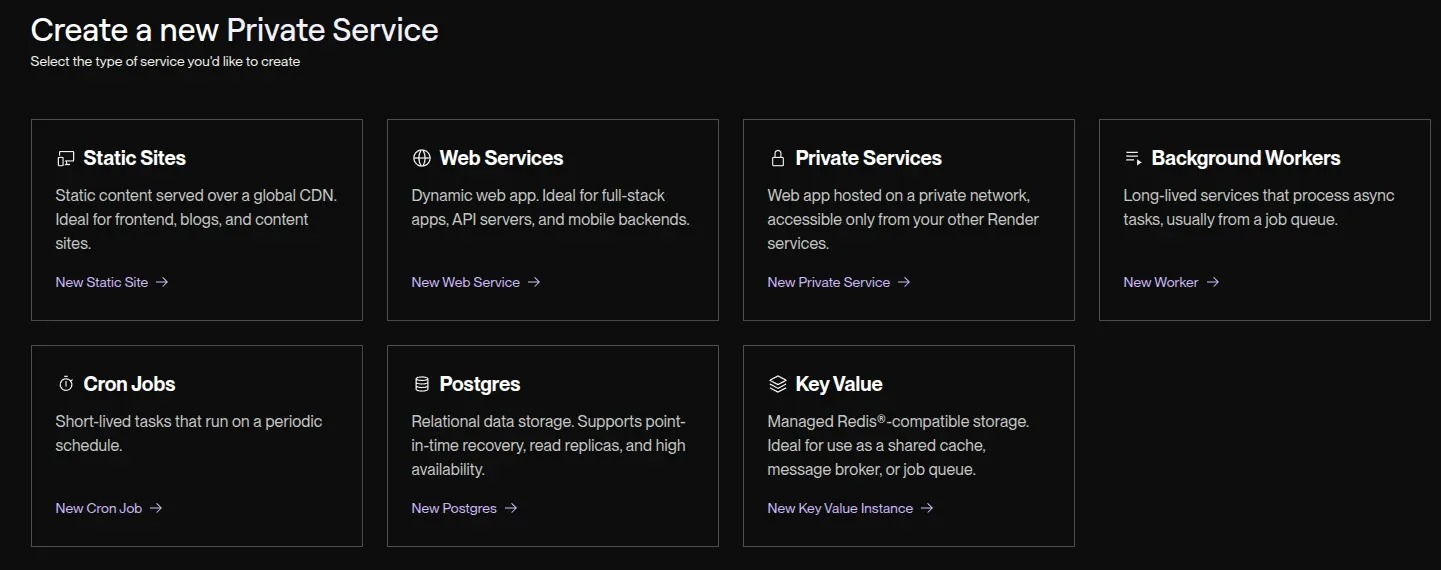
Create a new service in your project

-
Create a new WEB SERVICE
-
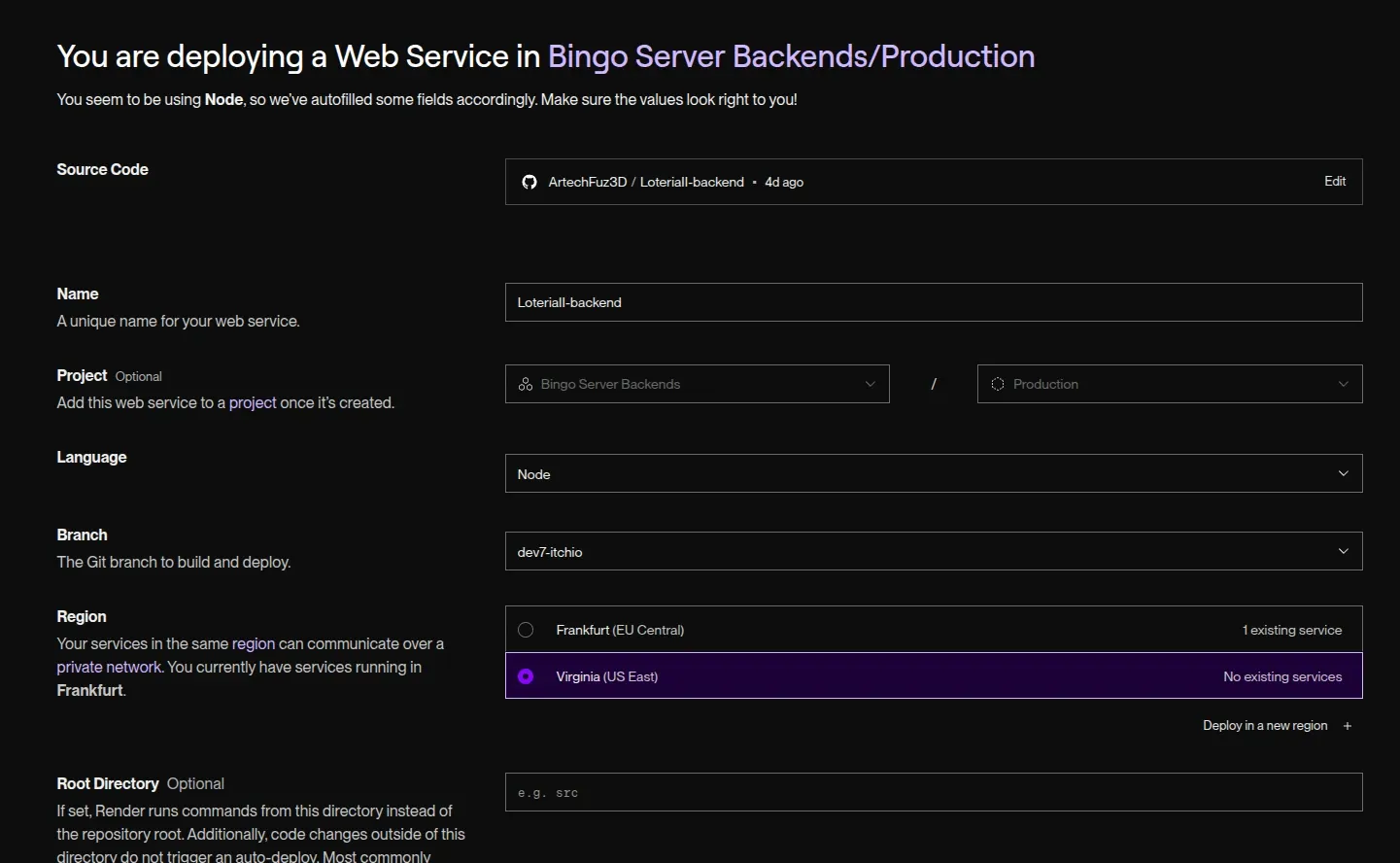
Choose Version Control Provider

-
Select Repo, Name, Language, Branch, Region
-
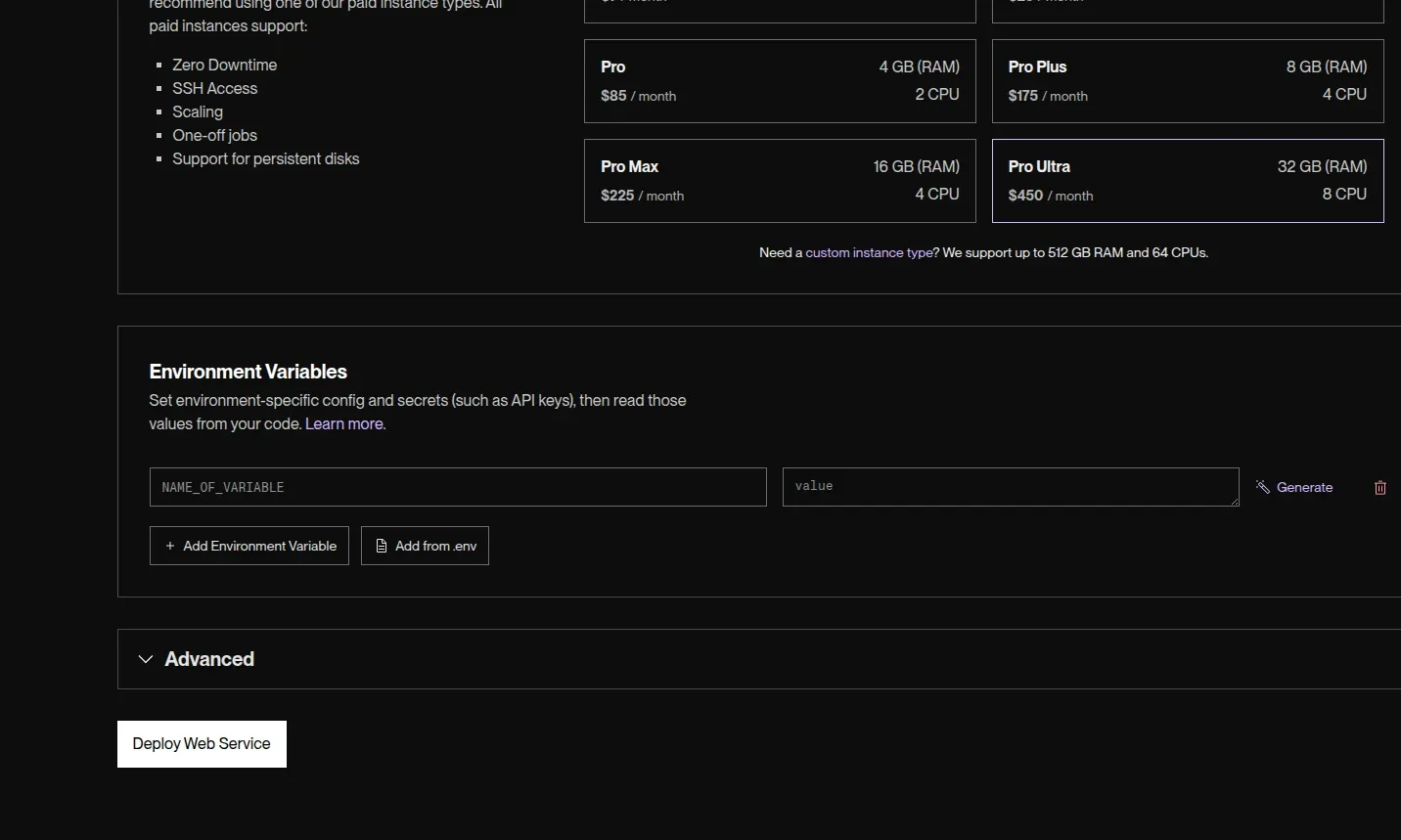
Root Directory, Build Command, Start Command, Instance Type

-
Deploy
-
Server Live
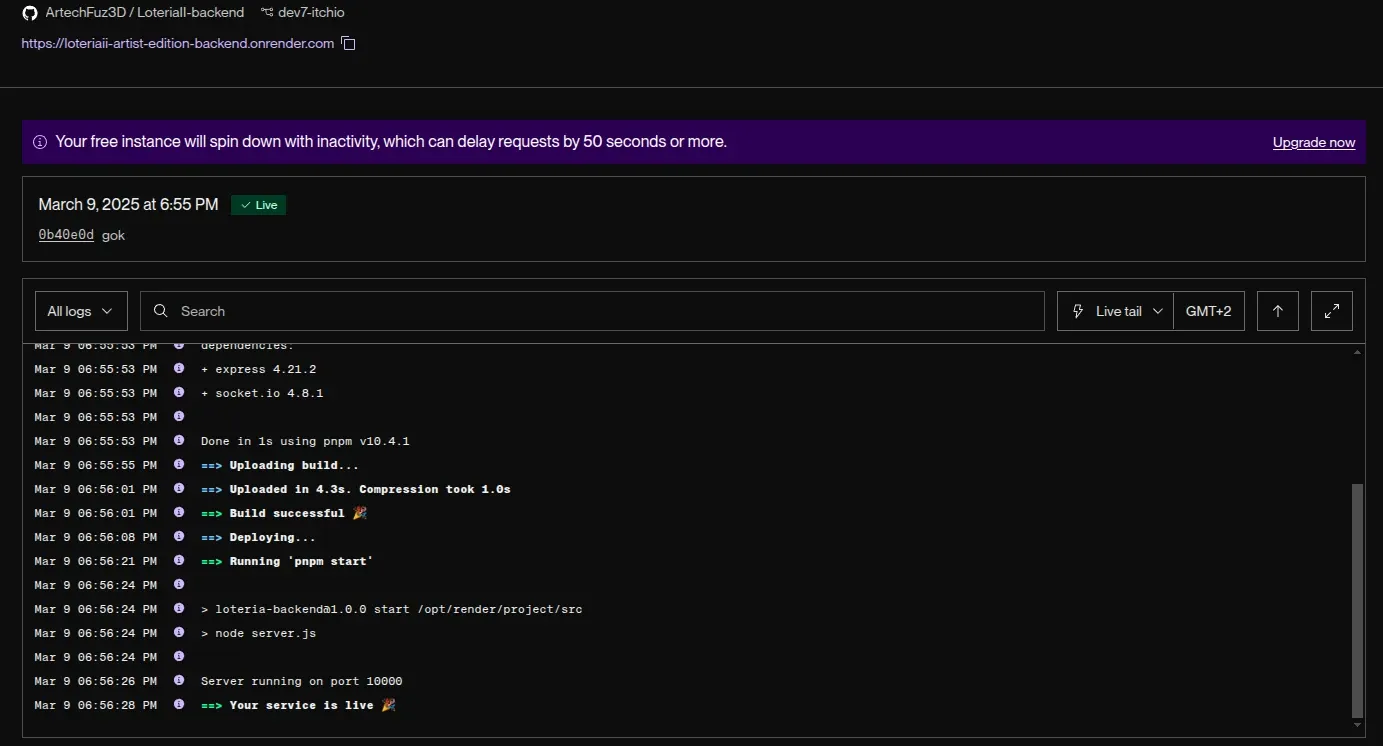
([[[[[[[[[[[[Successful test with astro-itchio-publisher]]]]]]]]]]]])